

What To Do When Things Go Technically Wrong

It’s amazing how many things can go wrong with your computer; bad drivers, hardware malfunctions, viruses, software glitches, spyware…and this is only the beginning.

Computer problems always seem to happen at the most inconvenient times and can leave you stranded for hours, even days without a computer.

How to best utilize mobile tech for staff

Love it or hate it, mobile technology in the workplace is here to stay. While more and more companies are utilizing it as a way to up their productivity, there is a right and a wrong way to go about it. Here are four tips to help you successfully integrate mobile devices into your organization […]

How is BYOD a security risk?

Bring your own device (BYOD) strategy is when an employee uses their personal mobile device to work with your company from anywhere. This strategy can bring about many advantages to your business such as increased efficiency and convenience. However, this can also bring a number of security risks for your IT infrastructure and data. If […]

Using Facebook emoticons to your advantage

Your news feed is about to get a lot more expressive, thanks to Facebook reactions. Aside from ‘Liking’ a status update, you now have five more options to express what you feel about a post. The new feature not only makes it easier for you to appropriately react to a piece of bad news but […]

How to find out if your computer has a virus

Your computer has been acting up a lot lately. It keeps crashing, it’s slow and, to top it off, you keep getting pop-ups you don’t want to see. If these problems keep occurring then your computer may have a virus. So is there a way to prevent things like this from happening again? While there […]

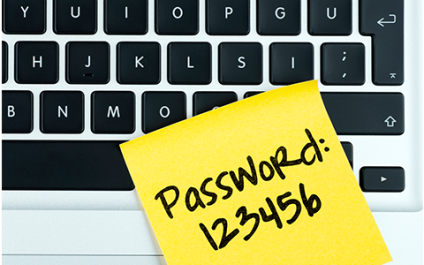
Are You STILL Keeping Critical Passwords On A Post-IT Note Next To Your Computer? Read On For An Easy Way To Remember Your Passwords And Maintain High Security…

One of the hardest habits we struggle to get our clients to break is writing down their passwords on sticky notes by their PC. Obviously this is a security risk. Another bad habit is choosing really easy-to-remember passwords such as “password.”

But admittedly, it CAN be hard remembering all of those darn passwords that are always changing.

Tips For Handling, Storing, and Disposing Of Confidential Documents

In the past 10 years, over 10,000 new regulations have been placed on the books by local, state and federal agencies pertaining to the handling, storage, and disposal of confidential client, patient, and employee documents.

A few examples are:

SEC Rule 17a-4 Electronic Storage of Broker Dealer Records Graham-Leach-Bliley Act
Financial Services Modernization Act
Sarbanes-Oxley Act
DOD 5015.2 Department of Defense
Health Insurance Portability and Accountability Act (HIPAA)
Fair Labor Standards Act
Occupational Safety and Health Administration (OSHA) Act
Payment Card Industry Data Security (PCI DSS)

No matter how small your business is, you are surely going to be affected by one or more of these new government regulations.

3 Disaster Recovery myths

Disaster Recovery ain’t what it used to be. Long gone are the days where a DR solution cost over a hundred thousand dollars and predominantly relied on tape backups. With the onset of cloud computing, today’s DR landscape has dramatically changed. But, unfortunately, there are still many misconceptions about DR still hanging around. Here are […]